
There’s a good chance your site is on WordPress. If so, priority #1 is to keep it above the earthworms. Keeping your site up and functional is critical for business, partly because it’s critical for your local SEO.
For a WordPress site, plugins giveth and taketh away. They’re half the point of the platform. The AI era hasn’t changed that yet: For now, WordPress is still ubiquitous, and so are plugins, including those that break and cause sites to catch fire. The good news is that AI has at least made preventive maintenance a little easier, which can save your bacon.
Exactly how can you tap into that, though? You may know that systems run by AI chatbots (e.g. Claude Code) can make changes to your site, but you may not want to rely on that just yet. What if you want AI to help you find and fix holes in your site, but don’t quite trust it enough to pack your parachute?
If that’s the case, I suggest you use your AI tool of choice (or maybe a few) to do a quick review all of your installed plugins and give you recommendations. It’s a practical first step if:
- You’re not sure how much access to give the AI tool.
- You want only recommendations for now, and will figure out the implementation later.
- You want the recommendations to be clear and simple, partly so if something goes wrong you can get the horse back into the barn.
- You may want feedback from a variety of AI tools, and not just from one, in which case you need a simple and low-risk way to let them all peek into your site without clunking heads.
You’re not ignoring the utility of AI, nor are you handing it the keys. If you have developers, you’ll help them help you. If you are your own webmaster, it will save you some time or guesswork.
Here’s all you do:
- Log into your WordPress site and go to “Installed Plugins” (under “Plugins”).
- Save the “Installed Plugins” page you see as a PDF. (Open up “Print…”: CTRL+P on a PC, or Command-P on a Mac.) It will be ugly, with goofy formatting. That’s OK.
- Upload that PDF to your AI chatbot of choice and ask for its assessment, perhaps with a prompt like this:
Based on your knowledge of WordPress plugins and on the attached PDF, what specific plugins installed on mysite.com might be security vulnerabilities or might pose other problems? Please put your findings in a short prioritized audit memo.
That’s it. A couple of minutes of work for you, and a couple of minutes of work for your AI helper (I like Claude). You may have follow-up questions, or the suggestions might be pretty self-explanatory.
Most likely, what you’ll get is a triage: advice on which plugins should stay, which plugins should be removed, and which plugins are “maybes.” The AI chatbot will probably also tell you which plugins you can simply remove now, and which plugins might require some prep or a replacement. Here are the kinds of recommendations you might get:
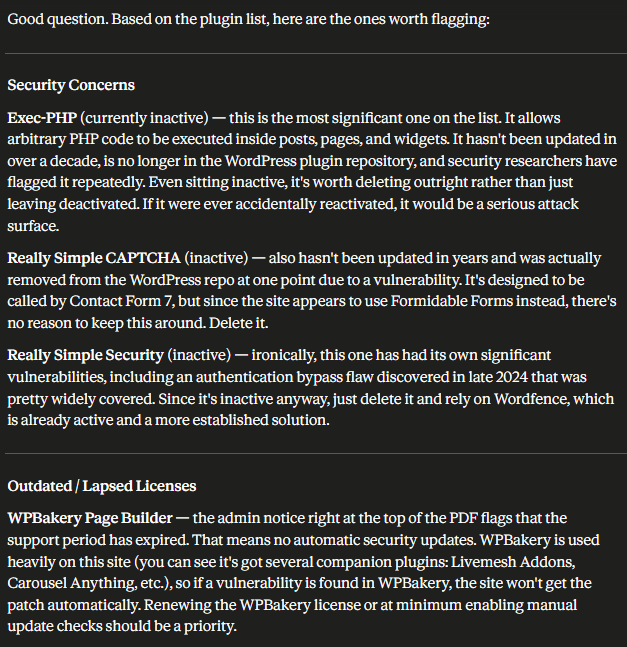
Here’s what you might see in a tidy, deliverable report:
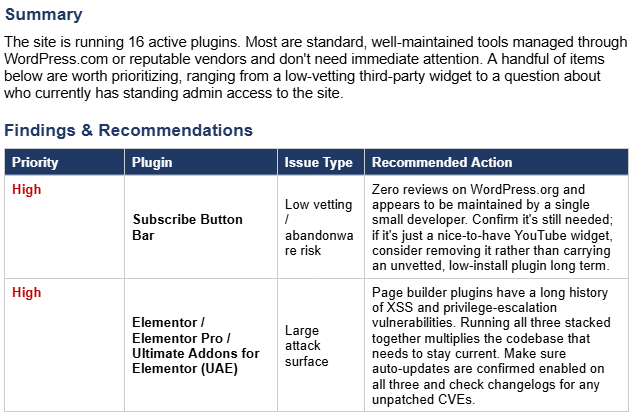
Your mileage may vary. Of course, I have no way to know what you’re running on your site, and the AI recommendations are completely situational. In general, though, I recommend running as few plugins as possible, but removing plugins gradually (rather than all at once). When in doubt, get feedback from a developer or two, and maybe even from your SEO gofer.
The goal of your plugin sweep, of course, is simply to keep your site from going down or becoming unusable. That’s usually a local rankings killer. As you probably know, a bad or updated plugin can lead to malware infestations or other hacks, which often result in your site being taken down by your host or being deindexed by Google. A conflict between multiple plugins can cause server errors or other malfunctions, which in turn can cause problems ranging from a contact form that doesn’t work to high-ranking pages dropping out of the index. Any of the above can also increase the chances that your Google Business Profile page gets suspended, drops in the rankings, or stops generating business, once competitors or would-be customers see that your site is down.
It’s usually not a big deal if your site is offline for a day or two. But downtime longer than that can derail your rankings in the organic results and the Google Maps results (and probably the AI results), and it can irritate or infuriate customers and would-be customers. Even one unhappy plugin can bury you in rubble.
How has AI helped you keep your WordPress site in one piece? If you’re not using WordPress, is there a similar AI-assisted equivalent of the plugin audit I’ve described? Any questions or tips? Leave a comment!